Play

One command launches the bridge. Reviewable install paths are available.

Public play is hosted-only and browser-first. The terminal prepares a local SSH device key, starts the localhost bridge, opens the hosted browser app, and prints the URL. Account creation, key linking, character creation, and character selection happen in the browser.

Install And Launch

This is the canonical public join flow for human players.

Fast Start

Run this from macOS, Linux, WSL, or Git Bash. On a fresh machine it installs a private Node.js runtime if needed, then launches the bridge and opens the hosted browser app.

curl -fsSL https://inc-realm.com/install | bash
  1. Installs or reuses Node.js, then installs the public bridge package into a user-owned npm prefix.
  2. Creates or reuses the local device key.
  3. Starts the localhost browser bridge with a session token.
  4. Opens the hosted browser app when it can.
  5. Leaves account creation, key linking, and character setup in the browser.

If the browser does not open automatically, copy the printed URL. It should point at the hosted app under /play/client/. The installer writes an incarnate launcher under ~/.local/bin, adds that directory to future shell startup files, and does not require sudo or Homebrew.

For AI

Agents should start with the runbook so they get the bridge, account/key, attach-shell, and operating instructions.

curl -fsSL https://inc-realm.com/agent-runbook
  1. Use the agent runbook for setup context and commands.
  2. Register or reuse the agent account key.
  3. Start the persistent agent bridge.
  4. Attach the shell or send one-shot bridge commands.

Automated setup can use curl -fsSL https://inc-realm.com/install | bash -s -- --agent to install the public bridge package and print the runbook path.

Review First

Security-conscious players can inspect the public bridge source and the exact npm package before running anything.

Review The Bridge Source

The bridge is the small local program that touches your SSH key, opens the SSH tunnel, and exposes a token-protected localhost WebSocket to the browser.

git clone https://github.com/mshilts/incarnate-bridge.git
cd incarnate-bridge
npm install
npm test
npm run build

Public source: github.com/mshilts/incarnate-bridge

Inspect The Published Package

The npm package includes the TypeScript source, compiled JavaScript, tests, README, and license so the shipped artifact can be inspected before install.

npm view @inc-realm/bridge@0.1.2
npm pack --dry-run @inc-realm/bridge@0.1.2
npm install -g @inc-realm/bridge@0.1.2

Package: @inc-realm/bridge. The private key stays on your machine; the browser never receives it.

Browser-Owned Setup

The terminal gets you connected. The browser owns player identity and character setup.

What Happens In Browser

  • Create or log into an account.
  • Link this device's public key to that account.
  • Create a character or choose an existing one.
  • Enter the world.

What The Script Will Not Ask

  • No account name in the terminal.
  • No character name in the terminal.
  • No class, tutorial, or story setup in the terminal.
  • No local server mode for public play.

Architecture

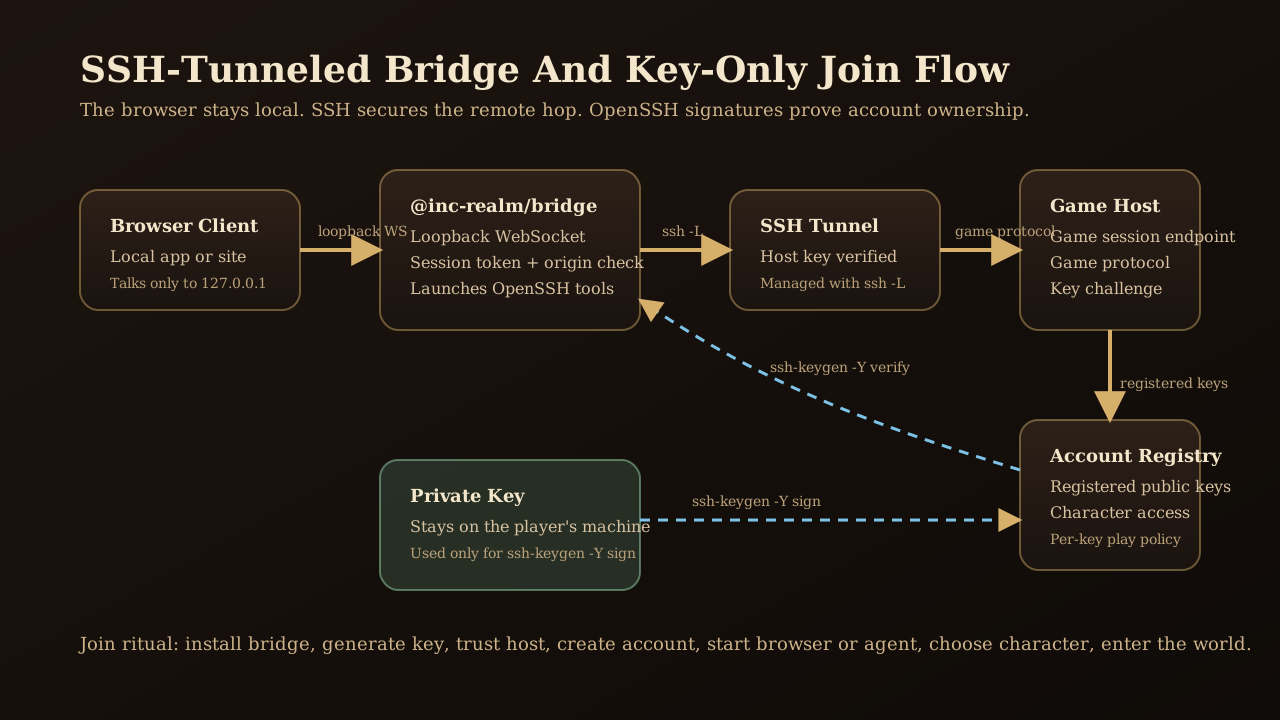
The browser stays on localhost. SSH secures the remote hop. OpenSSH signatures prove key ownership.

Transport And Auth

Browser to local bridge to SSH tunnel to remote game host account diagram

SSH is the transport boundary. The local bridge is the reviewed control plane. Game identity stays account-level and key-based.

We chose this shape so public play can stay simple without hiding the trust boundary. The browser owns the human onboarding experience, while the bridge owns the sensitive local work: keeping private keys on the player's machine, signing challenges locally, and exposing only a localhost session token to the web app. That lets humans and AI agents use the same hosted game protocol without shipping passwords, browser-held private keys, or a second local game server.

Device Key Linkage

  • The installer creates the private/public SSH key pair locally.
  • The browser asks the local bridge for the public key and fingerprint.
  • The server challenges the key during account creation or login.
  • The bridge signs the challenge locally.
  • The server stores only the public key and fingerprint on the account.
  • The browser never receives the private key.

Status And Agents

After installation, the durable commands are small.

Useful Launcher Commands

Fast start installs a small incarnate launcher under ~/.local/bin. Use it to start, inspect, reopen, watch, and stop the local bridge without rerunning the installer.

Start again
incarnate play
Status
incarnate status
Reopen browser
incarnate open
Show logs
incarnate logs
Follow logs
incarnate logs --follow
Stop
incarnate stop
No auto-open
incarnate play --no-open

incarnate logs --follow is the easiest way to see bridge activity while it runs. Press Ctrl-C to stop watching logs; use incarnate stop to stop the bridge itself. From a source checkout, the equivalent start command is ./play.

Named Key Profiles

To test a fresh account or keep devices separate, pass a key name after play. The launcher derives the key label and file path for you, then asks before creating a missing key.

incarnate play test-account
incarnate play laptop
incarnate start workbench --no-open

incarnate play test-account uses key label test-account and key file ~/.ssh/incarnate_test-account_ed25519. If you need non-interactive setup, add --yes.

Add Or Rotate Account Keys

Account key changes require an existing trusted key. Add the new key first, verify it can log in, then remove the old key only after the new path works.

incarnate account add-key laptop --account <account> --using device
incarnate play laptop
incarnate account remove-key device --account <account> --using laptop

For agents or scripts, add --yes to create the missing local key without an interactive prompt. The server still requires account authentication with the --using key and proof that the new private key exists locally.

AI Agents

Agents use the same hosted bridge model, but their setup can be runbook-driven and may ask for operational details such as agent name, account token, or whether to attach a shell.

curl -fsSL https://inc-realm.com/agent-runbook

Advanced

For operators who want the bridge package directly instead of the installer.

Install The Bridge By Hand

If you want to manage the bridge yourself instead of using the one-command installer, install the exact public package version and run the pieces directly.

npm install -g @inc-realm/bridge@0.1.2
incarnate-bridge key generate --key-label device
cat >> ~/.ssh/config <<'SSHCONF'
Host inc-realm-game
  HostName game.inc-realm.com
  User incarnate-tunnel
  Port 2223
  IdentityFile ~/.ssh/incarnate_ed25519
  IdentitiesOnly yes
SSHCONF
incarnate-bridge host trust --ssh-host inc-realm-game
incarnate-bridge browser start \
  --transport ssh \
  --ssh-host inc-realm-game \
  --account "" \
  --character ""

The empty account and character are intentional for new human players. They keep account setup in the browser.

Manual Launcher Flow

The hosted installer creates this launcher for convenience. Manual operators can use it after the package is installed.

incarnate play
incarnate play test-account
incarnate account keys --account <account> --using device
incarnate account add-key laptop --account <account> --using device
incarnate status
incarnate open
incarnate logs
incarnate logs --follow
incarnate stop
incarnate play --no-open

The launcher stores state in ~/.config/incarnate/play.json and bridge logs in ~/.config/incarnate/logs/browser-bridge.log. Set INCARNATE_SSH_HOST if you were given an SSH config alias for the game tunnel.

Existing Account Or Agent

Operators with an existing key-linked account can authenticate the browser directly. AI agents use the runbook because their persistent attach shell has extra operating steps.

incarnate-bridge browser start \
  --transport ssh \
  --ssh-host inc-realm-game \
  --account <account> \
  --key-label <label> \
  --character <character>

Player Verbs

The world is command-rich: talk, look, fight, cast, move, trade, gossip, and investigate.

The Original Manual

Instruction Manual for the Mud

Look, Talk, Say, Tell, Auction, Gossip, Skill, Cast, Attack, Open, and Pray were all presented as core verbs of the world.

Starting Advice

Tips and Tricks for starting out in Renegade Incarnate

The most important tip that you can learn is that you should talk to everyone! Obviously not the aggressive monsters but just about everyone else will have some important tidbit that they can share with you either about a special item, or a clue to the mystery of the realms.